
UP-Context-Engineering Method (University-365 Prompting-Context) - The new gold standard for prompt engineering

Updated: Oct 8

In this Prompting Publication
Artificial‑intelligence models are only as good as the instructions they receive. Most people still type ad‑hoc prompts, wasting tokens and exposing their organisation to brand, legal, and data‑quality risks. University 365’s UP-Context-Engineering Method™ (University‑365 Prompting-Context) solves this by breaking every prompt into smart, reusable building context-engineering blocks. This provides AI with the precise and personalized context it needs to focus better on the actual prompt, tasks, or questions, dramatically improving answer quality with every request. The UP-Context-Engineering Method helps you take your AI conversations from Prompt Engineering to Context Engineering.
A U365 5MTS Microlearning 5 MINUTES TO SUCCESS Lecture Essentiall | UP University 365 Prompting |
INTRODUCTION
Why you should care
Prompt Engineering skills, "the art of Prompting," "How to write the best prompt," Generative AI and LLMs have brought new concepts to the world that are sometimes among the most misunderstood and poorly mastered.
Everyone can write a prompt, of course, but will that prompt be the one that gives the AI the best instructions to provide the best answer? The optimal response. Not obvious! Most people talk to AIs and write prompts as if they were addressing their neighbor, without respecting the basic rules that allow for satisfactory answers.
As we know, a chatbot powered by a generative AI LLM is designed to provide an answer, regardless of the question, and leaves the user to assess the quality or relevance of that answer on their own. How many times have we seen "prompt libraries" published with instructions that boil down to 1 or 2 simple sentences like "Write an article about the advantages of electric cars for my automotive blog" or "Create a study plan to learn plate tectonics in a week."
In response to these two prompts, you will receive answers, but they will obviously be particularly "poor" and certainly not personalized or adapted to the true context in which they are situated for you. Indeed, in these two cases, the AI knows nothing about you, your habits, your preferences, knows nothing about your Blog on automobiles, its editorial line, its philosophy, and therefore, one should not expect a result that truly corresponds to you. To write the best prompt, numerous prompting techniques exist and are proposed. But unfortunately, we are always pressed for time; we want to go fast and, even while respecting the basic rules that consist of always giving a role, providing context elements, etc., we find that the temptation is strong not to sufficiently detail these roles, these contexts, and also from one prompt to another, not to have consistency in these descriptions. So, to make a long story short, brilliant ideas often stall in front of a blinking cursor while individuals and teams wonder, “How can I the most effectively possible ask the AI for exactly what I need?”, and, in a team, "How can I ensure that all team members who also use AI will respect the company, its brands, its values, and its context when giving prompts to the AI, in order to achieve the best results?"
Hasty, one‑off prompts scatter vital facts, mangle brand voice, and burn through tokens, leaving educators, executives, and learners drowning in rewrites and compliance headaches.
The Big Picture
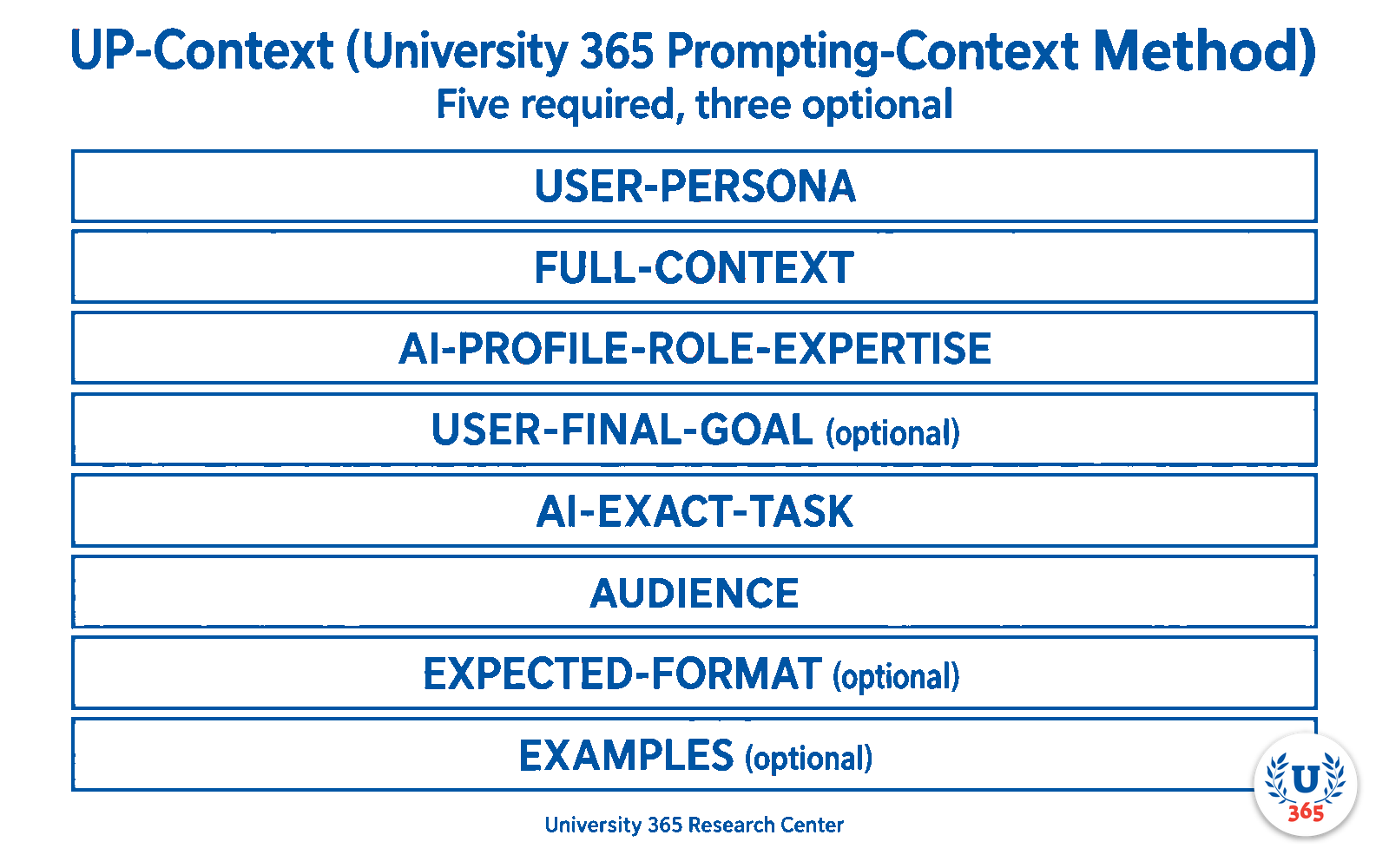
The UP-Context-Engineering Method™ (also called UP Method) turns that chaos into crystal clarity. UP-Context-Engineering stands for "University 365 Prompting-Context". By lifting the static parts of every request, like USER-PERSONA, FULL-CONTEXT, AI-PROFILE-ROLE-EXPERTISE, USER-FINAL-GOAL, AI-EXACT-TASK, AUDIENCE, EXPECTED-FORMAT and EXAMPLES, into reusable modules files in markdown or JSON format and leaving only the live Task to change, UP-Context-Engineering Method (UP-Context-Engineering) delivers repeatable, audit‑ready prompts in seconds.
The result: consistent tone, ironclad accuracy, 40 % lower AI costs, and a friction‑free path from question to “superhuman” answer.
In short, UP-Context-Engineering is the elevator that carries your ideas past the prompt‑engineering maze and straight to high‑impact, AI‑powered outcomes.

The Basics of UP-Context-Engineering
The basics of UP-Context-Engineering involve considering eight layers for every prompt, five required and three optional: USER-PERSONA, FULL-CONTEXT, AI-PROFILE-ROLE-EXPERTISE, USER-FINAL-GOAL (optional), AI-EXACT-TASK, AUDIENCE, EXPECTED-FORMAT (optional) and EXAMPLES (optional). A layer is text in the prompt first; any layer whose text is long enough and reused across prompts can be kept as a reusable file instead of being retyped. Depending on the request submitted to an AI, the user writes the request-specific layers and reuses the saved ones.
Layer | What it contains | Why it matters |
USER-PERSONA | Who is asking | Aligns with the asker’s goals |
FULL-CONTEXT | Facts, data, brand assets, etc. | Eliminates factual drift |
AI-PROFILE-ROLE-EXPERTISE | The AI’s profile, role and expertise | Ensures tone & domain expertise |
USER-FINAL-GOAL (optional) | The big-picture goal the user is working toward | Points every answer at the real target |
AI-EXACT-TASK | The exact job asked now | Focuses the answer on the current request |
AUDIENCE | Who the output is for; may cover several personas | Tailors voice, depth, format |
EXPECTED-FORMAT (optional) | The shape of the answer | Makes the output usable as delivered |
EXAMPLES (optional) | Reference examples that set the standard | Guides quality by demonstration |
When these static modules are combined with the AI-EXACT-TASK describing the Goal (the only part that changes), you get consistent, compliant, and hyper‑personalised answers, every single time. With time, you just have to update your layer files and care about that the correct version is attached to your Prompts or your Projects ("Projects" feature on OpenAI ChatGPT, Gems on Google Gemini, Projects on Anthropic Claude, Microsoft Copilot Studio, ...etc.).
The three parts of the AI-PROFILE-ROLE-EXPERTISE layer
The AI-PROFILE-ROLE-EXPERTISE layer has three parts, considered in this order: the AI-PROFILE, the AI-ROLE and the AI-EXPERTISE.
The AI-PROFILE is the AI mission profile in the CI-First sense, as described in the “Co-Intelligence” book and research of Ethan Mollick. It includes at least five distinct missions, such as “Co-Thinker/Creative”, “Coworker”, “Professor/Tutor”, “Coach” and “Challenger/Critical thinker”. The AI-PROFILE is the first descriptive level that justifies why the AI is invited, or hired, to the working table. It does not compete with the AI-ROLE: it is considered before the AI-ROLE.
The AI-ROLE is the function or title the hired AI occupies for answering the question or executing the tasks. Typically it is the position the AI would hold in the company, or the title written on its business card if the AI were a real person.
The AI-EXPERTISE is the set of skills, knowledge and competencies the AI should have to excel at the job or answer the question. It can sometimes be deduced from the AI-ROLE, but it can be more precise to state it explicitly.
Examples of a structured AI-PROFILE-ROLE-EXPERTISE layer:
“You’ll be my Coworker with the role of Project Manager with expertise in Data-Science and SQL.”
“You’ll be my Professor with the role of AI Prompt Engineer with expertise in Chat-GPT-5.6-Sol.”
UP-Context-Engineering layer files can give even better descriptions of the AI-ROLE and the AI-EXPERTISE.
How to read a UP-Context-Engineering prompt
Every UP-Context-Engineering prompt is built from the same eight layers, in the same order. Read them in that order and you always know what you are looking at, and which parts you can reuse: who is asking (USER-PERSONA), the situation (FULL-CONTEXT), the expert the AI must become (AI-PROFILE-ROLE-EXPERTISE), the goal it serves (USER-FINAL-GOAL, optional), the exact job asked now (AI-EXACT-TASK), who the answer is for (AUDIENCE), the shape the answer must take (EXPECTED-FORMAT, optional), and the examples that set the standard (EXAMPLES, optional).
One complete example, then the same request without the layers. With the layers: “USER-PERSONA: I run a two-person design studio and I write in plain English. FULL-CONTEXT: We are launching a subscription plan in October. AI-PROFILE-ROLE-EXPERTISE: Act as a pricing strategist for small software businesses. USER-FINAL-GOAL: I want the studio to reach a steady monthly income. AI-EXACT-TASK: Draft three pricing options for the October launch. AUDIENCE: Existing clients, non-technical. EXPECTED-FORMAT: A short table, one row per option. EXAMPLES: The two pricing pages we already use.” Without the layers, the same request reads “draft three pricing options” and the answer is generic, because the AI knows none of the eight things above.
Two habits make the layers easy to keep. First, put the eight layers in the FIRST prompt of a thread, or set them once as custom instructions in a Project, a skill or an agent; you do not repeat all eight in every message. Second, keep as files only the layers whose text is long and reused: usually the USER-PERSONA and the FULL-CONTEXT set. The rest you type, because typing a short line is simpler than attaching a file.
The neuroscience behind UP-Context-Engineering (UNOP alignment)
UP-Context-Engineering Method mirrors the chunking principle from cognitive‑load theory.
Information is grouped into coherent blocks that the brain (and the AI model, the LLM) can process faster and with perfect consistency between several prompts.
By off‑loading static facts into long‑term memory modules (USER-PERSONA, FULL-CONTEXT and AUDIENCE) that could be factorized and keeping working memory free for the current task, UP-Context-Engineering increases comprehension and retention, exactly what our UNOP pedagogy prescribes (University 365 Neuroscience-Oriented Pedagogy).
If you're a U365 student, we will teach you to use the UP-Context-Engineering Method with our UNOP, ULM, and LIPS principles. With ULM, the UP-Context-Engineering Method works wonders by helping you manage all six areas of your life consistently, using the help of AI.
Step‑by‑step guide (CARE‑friendly workflow)
CARE phase | Action with UP | Practical tip |
Collect | Gather evergreen facts (company profile, policies) and store them as Context_v1.md. | Use SharePoint or OneDrive for version control. |
Action‑Plan | Define key roles you’ll need (e.g., Marketing Director, Data‑Scientist Tutor) and write the AI-PROFILE-ROLE-EXPERTISE files. | Keep each file < 1 000 words; add semantic version numbers. |
Review | Every quarter, check for outdated figures; refresh modules and bump versions. | Automate with a “fresh‑until” date in file metadata. |
Execute | Assemble the eight layers (USER-PERSONA + FULL-CONTEXT + AI-PROFILE-ROLE-EXPERTISE + USER-FINAL-GOAL (optional) + AI-EXACT-TASK + AUDIENCE + EXPECTED-FORMAT (optional) + EXAMPLES (optional)) into one call. | A simple Python or Zapier wrapper can do this in < 200 lines of code. |
Quick examples
Upload the layer files to the Prompt (or to the Project in ChatGPT, Space in Perplexity, etc...) USER-PERSONA : persona_OpenAI_ceo_SamAltman_v1.1.pdf FULL-CONTEXT : OpenAI_company_profile_v3.2.pdf AI-PROFILE-ROLE-EXPERTISE : role_OpenAI_marketing_director_v2.0.pdf AUDIENCE : persona_OpenAI_board_v1.0.pdf
AI-EXACT-TASK (that could be concise and focused on the expected result) : “Adopt the role of Marketing Director of OpenAI. Draft for the board a 90‑day omnichannel launch plan for our new AI‑powered LMS. "Then, please write an engaging email in my name (Sam Altman) to brief the Board about the launch plan."
Result : The AI LLM (ChatGPT, Claude, Gemini, etc.) delivers a board‑ready launch plan document in one shot, aligned with brand voice and strategic metrics, and write the correspondant e-mail the in the name and voice of the CEO Sam Altman. Consistency and reusability : If the user needs the AI to work on a new request for the same company and with the same role (Marketinf Director in that example), but for a different AUDIENCE (ex. Financial department), he will simply write the AI-EXACT-TASK accordingly by uploading in addition the correct Layers Files :
Upload the layer files to the Prompt (or to the Project in ChatGPT, Space in Perplexity, etc...) USER-PERSONA : persona_OpenAI_ceo_SamAltman_v1.1.pdf FULL-CONTEXT : OpenAI_company_profile_v3.2.pdf AI-PROFILE-ROLE-EXPERTISE : role_OpenAI_marketing_director_v2.0.pdf AUDIENCE : persona_OpenAI_FinancialDepartment_v2.5.pdf
AI-EXACT-TASK “Adopt the role of Marketing Director of OpenAI. Write an email in my name (Sam Altman) to request the OpenAI Financial Department to prepare a budget for the launch plan.”
Obviously, the Layer Files can be shared by a team if necessary.
ROI snapshot (pilot data)
72 % faster prompt drafting.
41 % lower token spend.
+17 NPS points in learner satisfaction when UCopilot uses UP.
Zero compliance breaches across 1.2 M model calls.
Common pitfalls & pro tips
Pitfall | Fix |
Stale data in Context | Add an expiry field (expires: 2026‑03‑31) and automate alerts. |
Role collision (multiple AI-PROFILE-ROLE-EXPERTISE layers injected) | Declare a single master role or nest sub‑roles hierarchically. |
Prompt bloat | Use RAG to fetch only the relevant context paragraphs. |
Forgetting the audience | Always state the AUDIENCE layer; it forces clarity on tone and depth. |
Your next action (5‑minute challenge)
Open your LIPS Digital Second Brain.
Write the FULL-CONTEXT layer for one real project you know well.
Write the AI-PROFILE-ROLE-EXPERTISE layer for the expert you often need.
Write the AI-EXACT-TASK and test the result in U.Copilot.
Notice how the answer feels sharper, faster, and perfectly on‑brand.
Key take‑aways
UP-Context-Engineering = USER-PERSONA + FULL-CONTEXT + AI-PROFILE-ROLE-EXPERTISE + USER-FINAL-GOAL (optional) + AI-EXACT-TASK + AUDIENCE + EXPECTED-FORMAT (optional) + EXAMPLES (optional)
Modular prompts cut cost, boost quality, and ensure compliance.
UP is fully aligned with UNOP, LIPS, and CARE, making it brain‑friendly and system‑friendly.
You can implement a basic UP stack today and iterate over time.
CONCLUSION
Elevate every conversation
You now hold the blueprint for turning scattered, hit‑or‑miss prompts into a repeatable engine of clarity, compliance, and creative power.
UP Method’s simple equation: USER-PERSONA + FULL-CONTEXT + AI-PROFILE-ROLE-EXPERTISE + USER-FINAL-GOAL (optional) + AI-EXACT-TASK + AUDIENCE + EXPECTED-FORMAT (optional) + EXAMPLES (optional) aligns perfectly with the way both the human brain and large language models process information.
Master these eight layers, saving as files the ones you reuse and you will write less, spend less, and learn faster, all while projecting an unshakeable, on‑brand voice.
Next step: before today ends, convert one real‑world request into UP-Context-Engineering format and run it through Microsoft 365 Copilot, ChatGPT, Claude, Gemini or your favorite LLM. Feel the lift. Once you’ve levelled‑UP once, you’ll never prompt the old way again.
Become Superhuman, All Year Long, with every word you type.
Level‑UP every prompt !
Prompt Smart, Prompt UP !
Do you have questions about that Publication? Or perhaps you want to check your understanding of it. Why not try playing for a minute while improving your memory? For all these exciting activities, consider asking U.Copilot, the University 365 AI Agent trained to help you engage with knowledge and guide you toward success. You can Always find U.Copilot right at the bottom right corner of your screen, even while reading a Publication. Alternatively, vous can open a separate windows with U.Copilot : www.u365.me/ucopilot.
Try these prompts in U.Copilot:
I just finished reading the publication "Name of Publication", and I have some questions about it: Write your question.
---
I have just read the Publication "Name of Publication", and I would like your help in verifying my understanding. Please ask me five questions to assess my comprehension, and provide an evaluation out of 10, along with some guided advice to improve my knowledge.
---
Or try your own prompts to learn and have fun...
Are you a U365 member? Suggest a book you'd like to read in five minutes,
and we’ll add it for you!
Save a crazy amount of time with our 5 MINUTES TO SUCCESS (5MTS) formula.
5MTS is University 365's Microlearning formula to help you gain knowledge in a flash. If you would like to make a suggestion for a particular book that you would like to read in less than 5 minutes, simply let us know as a member of U365 by providing the book's details in the Human Chat located at the bottom left after you have logged in. Your request will be prioritized, and you will receive a notification as soon as the book is added to our catalogue.
NOT A MEMBER YET?




Comments